Dynamic node group queries are a great way to automatically organize your nodes into node groups based on their common properties. Node groups are a powerful mechanism used to group nodes with similar properties and roles. Node groups allow policies to be assigned, allow reporting to be grouped and allow benchmarks to be applied in different ways and different cadences depending on your requirements. Although you can manually assign nodes to groups, we strongly recommend using the built-in node rules and dynamic node group queries to automatically group nodes. For more information on the types of automatic node groups you can configure, see Node Groups.
In this article, you'll see a selection of examples of how to create dynamic node groups based on multiple properties. Being able to specify a number of properties allows you to be as specific or general as you like.
Note: Multiple property queries are available in v2.2820.0 onwards. If you are currently running a version prior to this, please refer to Multiple Query Workaround.
Common Complex Query Examples
To assign all Ubuntu nodes into a dynamic node group, use this query:
inventory:os_distro_name WITH value:ubuntu EXACT
To assign all Ubuntu 18.04 nodes into a dynamic node group, use this query:
inventory:os_distro_name WITH value:ubuntu AND inventory:os_distro_version WITH value:18.04 EXACT
To assign all Windows 2012 R2 Servers into a dynamic node group, use this query:
inventory:os_distro_name WITH value:Windows EXACT AND inventory:operatingsystem WITH value:2012 R2
Note: You don't need to quote the "2012 R2" part as our query tokenizer knows how to handle values with spaces.
To assign all Windows 2012 Servers, but not include the 2012 R2 servers, use this query:
inventory:osfamily WITH value:Windows EXACT AND inventory:operatingsystem WITH value:2012 AND NOT inventory:operatingsystem WITH value:R2
Multiple Query Workaround
Note: This section applies only to Cloudhouse Guardian instances before v2.2820.0.
The Problem
Dynamic Group Queries are a great tool in Guardian to promote automation. However, prior to v2.2820.0 they were limited in that you could only have a single query performed at a time. For example, you may want a dynamic node group based on a service installed on a node (Windows Firewall, in this example):
services:Windows Firewall EXACT
However, if you wanted to test to see if one service exists, but another service was absent, there was, unfortunately, no complex group queries that could combine these two requirements.
The Solution
To get around this, we'll use a bit of Powershell to create a configuration item that we can use for our dynamic query. If you are running a non-Windows based system, please contact Guardian Support and we can help provide a shell-based example.
In this example, we'll create a dynamic node group that includes nodes that have the Windows Firewall service installed but does not have the SQL Server (MSSQLSERVER) service installed.
First, we start by creating a Powershell scan option with the following parameters:
-
Description: Complex Group Membership -
Key Name: Leave this empty -
Query:Copy$result = "no"
if (Get-Service -Name "MpsSvc")
{
if (-not (Get-Service -Name "MSSQLSERVER"))
{
$result = "yes"
}
}
$result
You can adjust the query to check for any number of items on a node to determine if this node should be in the group or not. If it should be in the node group, then this script will output yes, otherwise, it outputs no.
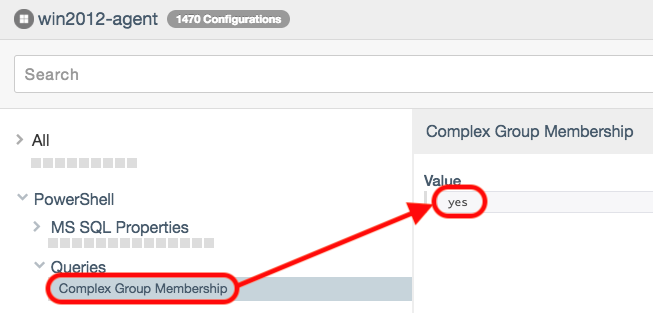
So now we can create a dynamic group query that uses this Powershell script to determine group membership:
PowerShell:Complex Group Membership WITH Value:yes EXACT
What Next?
Now that you have nodes arranged into node groups based on common roles and properties, you can assign policies and benchmarks to them. For more information about policies, see Policies. For more information on assigning and scheduling benchmarks to be run against nodes in your node groups, please see Benchmark Reports.